


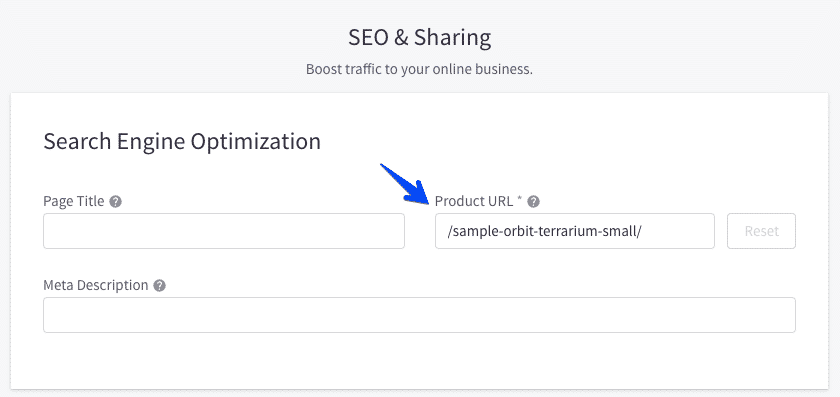
Routing in a web application is the process that resolves a particular URL path to a rendered page. Catalyst has a pre-built, opinionated routing scheme for all major storefront page types. BigCommerce products, categories, brands, and web pages each have a URL path value. These paths are available with various patterns, according to your preferences as set in Settings > General > URL Structure. The architecture of Routing in Bigcommerce Catalyst ensures that URLs in the storefront correspond exactly with these paths. On a Catalyst storefront, you can find the product with the URL path /sample-orbit-terrarium-small/ at the absolute path mystore.com/sample-orbit-terrarium-small/.
Routing File Structure
Let’s take a brief tour of the major route files and directories in Catalyst. As the Bigcommerce Catalyst utilizes the Next.js App Router, route files are in the app directory. The directories corresponding to URL patterns include:
- admin – A simple route that redirects to the control panel for the BigCommerce store.
- api – Contains routes for a few API endpoints, such as those related to customer authentication.
- sitemap.xml – Contains the route dedicated to generating the sitemap.
- [locale]/maintenance – The page displayed when the storefront is inactive.
- [locale]/(default) – A Next.js route group applying to all other storefront pages. The URL paths do not include the (default) directory name as a segment. The layout.tsx file in this directory contains a common layout for all typical pages.
Within [locale]/(default), there are other noteworthy route groups:
- (auth) – A group including all routes for customer registration, login, and password reset.
- (faceted) – A group including all routes that involve product list facet filtering, along with the Server Components and logic common to all of them.
The major storefront routes and their file locations with app/[locale]/(default) include:
- page.tsx – Home page
- (auth)/login/page.tsx – Login page
- (auth)/register/page.tsx – Register page
- (faceted)/category/[slug]/page.tsx – Category page
- (faceted)/brand/[slug]/page.tsx – Brand page
- (faceted)/search/page.tsx – Search results page
- product/[slug]/page.tsx – Product detail page
- cart/page.tsx – Cart page
- account/* – Pages within the customer account section
- compare/page.tsx – Product Compare page
- webpages/normal/[id]/page.tsx – Standard web pages
- webpages/contact/[id]/page.tsx – Contact Us web page
Custom URL Middleware
Next.js Middleware can block requests before they reach a specific route, modifying or redirecting them. The central middleware entry point – middleware.ts – loads and executes multiple middleware functions. But the most important one to you should know is the middleware related to custom URLs.
Note the pattern of the file paths for most of the routes as discussed above. It includes fixed URL segments like product and dynamic segments like [slug] or [page]. Take a look at the logic in the product detail page route file. You’ll notice that the [slug] parameter is actually expected to be the numerical ID of a product.
This means the route would actually correspond with a URL like mystore.com/product/123. This does not match the expected URL paths of products, categories, etc, that we previously reviewed. We expect URLs like mystore.com/sample-orbit-terrarium-small/. Such URLs contain nothing to identify whether they correspond to a product, category, brand, or web page. Catalyst utilizes middleware to block such requests and determine their final routing.
middlewares/with-routes.ts contains the logic dedicated to this re-routing. It makes an initial GraphQL request to retrieve the type and ID of whatever entity matches the route. This info is then used to “rewrite” the request URL path, such that Next.js understands the path to be something like the above /product/123 example and directs the request to the final matching route.
Routing Performance Strategies
The Catalyst route architecture and custom URL middleware include a couple of key strategies. They are designed to make the routing and rendering of pages as fast as possible.
KV Storage
The above logic for determining a dynamic URL path’s final routing involves an extra GraphQL request. That must be performed in sync, before the main data fetching for a given page’s content. It’s also not the only such request. The same middleware also queries for the store status to determine if the maintenance page should be served. These additional round trips to the BigCommerce API have the potential to greatly impact page load times.
To optimize this process, Catalyst uses a key-value (KV) store to cache the results of these routes and store status GraphQL requests. In local development environments, the implementation used for this store is a simple JavaScript Map that is not purposeful. In deployed environments, however, a true KV database implementation is expected. This means, in practice, only a small part of page renders will ever need to make the GraphQL requests for store status and the route information for a particular path.
Catalyst has built-in support for Upstash for Redis, the default storage available on Vercel. However, it’s simple to implement your own. The following are important components for the KV store in the application:
- lib/kv/adapters – Contains the built-in adapters. If you examine the adapter files in this directory, you’ll see that they are each an extremely lean implementation of the KvAdapter interface.
- lib/kv/index.ts – The createKVAdapter function in this file contains the logic for selecting a KV adapter.
Partial Prerendering
Catalyst makes use of Next.js partial prerendering (PPR) to allow page routes to combine static and dynamic content. This means that page content that does not depend on dynamic data, such as the site <head> that loads CSS and JavaScript, can be delivered as quickly as possible. It does not wait for the rendering of content that relies on dynamic data.
Catalyst utilizes PPR for the best page load performance throughout the storefront. Key areas where you’ll see configuration related to PPR include:
- next.config.js – In the configuration value experimental.ppr
- app/[locale]/(default)/layout.tsx – With the expression experimental_ppr = true
In order to make effective use of PPR, components that use dynamic data should be combined with React Suspense. Catalyst uses this strategy primarily through the Stream component.
Please contact us at manish@bay20.com or call us at +91-8800519180 / +91-9582784309 for any support related to Bigcommerce. You can also visit the Bigcommerce development page to check the services we offer.






