

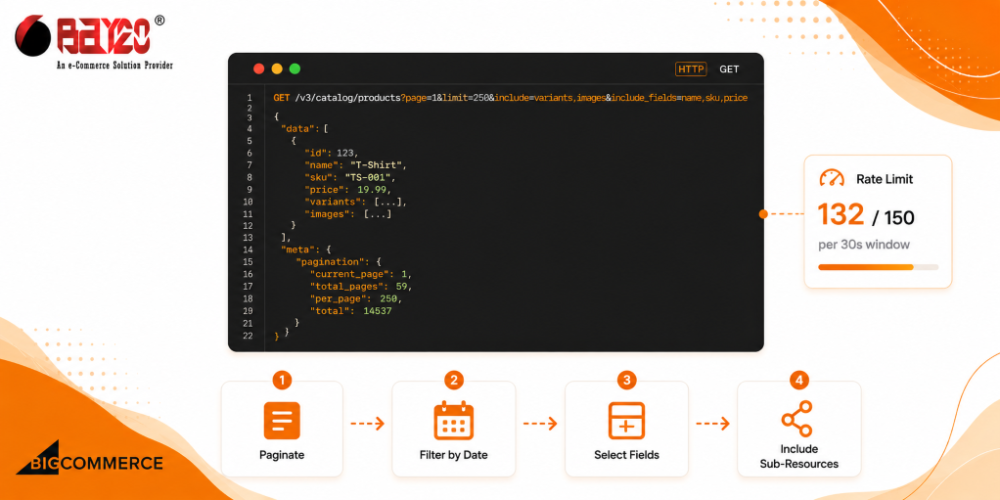
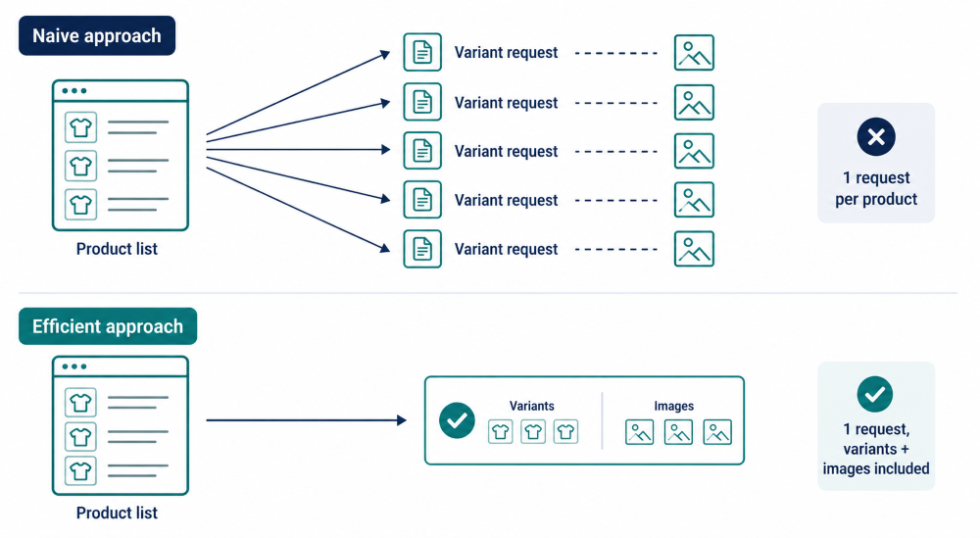
Most people write their first BigCommerce sync script the same way. Loop through every product, then for each one, fire off another request for its variants. Another request for its images, maybe a third for custom fields. It works. It also completely falls apart the moment your catalog stops being a fifty-item test store and turns into fifteen thousand real SKUs. Because that script just turned into tens of thousands of API calls to do something that should’ve taken sixty.
The tools to avoid this are all available in the Catalog API. They are pagination limits, field selection, sub-resource inclusion, and proper filtering. Most people just don’t reach for them until the slow version has already cost them a few hours.
Pagination and the default limit nobody notices
GET /v3/catalog/products hands results back a page at a time through page and limit. You can ask for up to 250 items per page, which is the max. Leave limit off entirely, and you get 50 back by default, and this is the part that trips people up, because a “full catalog export” that quietly returns a fifth of the catalog looks like it worked. No error, no warning, just fewer products than you expected sitting in your output file.
GET /v3/catalog/products?page=1&limit=250The response tells you exactly where you stand through meta.pagination, current page, total pages, total count:
{
  "data": [ /* ...products... */ ],
  "meta": {
    "pagination": {
      "total": 14732,
      "count": 250,
      "per_page": 250,
      "current_page": 1,
      "total_pages": 59
    }
  }
}
Loop until current_page hits total_pages, done. Don’t try to do anything unnecessary. Just don’t forget the limit exists, or you’ll be making 295 requests to do a job that only needed 59.
Trim the payload before you run the API request
Every product comes back loaded with fields you almost certainly don’t need for whatever you’re doing right now: full descriptions, SEO metadata, custom field arrays, the works. If all you actually care about is syncing price and inventory across fifteen thousand products, dragging the entire object across the wire every single time is wasted bandwidth and wasted parsing on your end for no benefit.
include_fields and exclude_fields handle this:
GET /v3/catalog/products?include_fields=name,sku,price,inventory_levelYou get back only what you asked for, plus id, which is always included whether you request it or not. Flip it around with exclude_fields when you want almost everything except one specific heavy field like description. On a full crawl, this alone can shrink your response sizes enough that you actually notice the difference in how long the run takes.
Getting variants and images without a request per product
This is where the classic N+1 problem shows up, and almost everyone hits it at least once. You pull a page of products, then loop through that page making a separate call per product just to get its variants, because that’s how the resource looks like it’s structured at first glance. On a catalog of any real size, that turns into thousands of extra round trips for data you could’ve had in the very first request.
include fixes this by nesting the sub-resources straight into each product object in the list response:
GET /v3/catalog/products?include=variants,imagesNow every product in the array shows up with its variants and images already attached, no follow-up call needed. There’s one thing worth knowing before you lean on this everywhere: if you include options or modifiers, results get capped at 10 per page no matter what you set limit to. So a crawl that needs full option data ends up paginating through a lot more, smaller pages just for that slice of the run. Worth planning for ahead of time, because otherwise you’re staring at row counts that don’t add up and wondering what broke.
Filter for what changed, not for everything
A lot of real use cases don’t need the whole catalog, they need whatever’s different since last time. An inventory sync job doesn’t care about the ten thousand products that haven’t changed since yesterday. date_modified filtering is built for exactly this:
GET /v3/catalog/products?date_modified:min=2026-09-01T00:00:00Pair that with include_fields and a full catalog crawl turns into a small, fast, incremental sync instead. A few other filters worth knowing about while you’re at it: categories:in for pulling products across several categories in one call (plain categories only matches products in exactly that single category, which catches people off guard the first time), skus:in for grabbing a specific set of SKUs in one shot instead of one request per SKU, and id:in for the same idea when you’re working off a list of product IDs from somewhere else in your stack.
GET /v3/catalog/products?skus:in=SKU-001,SKU-002,SKU-003Keeping a full crawl inside the rate limit
Standard and Plus stores get 150 requests every 30 seconds, Pro gets 450, same shared quota as every other Catalog API call you’re making. A 59-page crawl at max page size fits comfortably inside that window even on a Standard plan, but it’s still worth adding a small pause between pages, especially if anything else, another script, another app, might be using the same store’s credentials while yours is running.
import axios from "axios";

const client = axios.create({
  baseURL: `https://api.bigcommerce.com/stores/${process.env.STORE_HASH}/v3`,
  headers: {
    "X-Auth-Token": process.env.BC_ACCESS_TOKEN,
    "Content-Type": "application/json",
  },
});

async function fetchAllProducts({ fields, filters = {} } = {}) {
  let page = 1;
  let totalPages = 1;
  const allProducts = [];

  do {
    const res = await client.get("/catalog/products", {
      params: {
        page,
        limit: 250,
        include: "variants,images",
        include_fields: fields,
        ...filters,
      },
    });

    allProducts.push(...res.data.data);
    totalPages = res.data.meta.pagination.total_pages;

    const requestsLeft = parseInt(res.headers["x-rate-limit-requests-left"] || "999", 10);
    if (requestsLeft < 10) {
      const resetMs = parseInt(res.headers["x-rate-limit-time-reset-ms"] || "2000", 10);
      await new Promise((r) => setTimeout(r, resetMs));
    }

    page++;
  } while (page <= totalPages);

  return allProducts;
}

// incremental sync of just what changed since yesterday
const changed = await fetchAllProducts({
  fields: "id,name,sku,price,inventory_level",
  filters: { "date_modified:min": "2026-09-03T00:00:00" },
});
None of this is complicated in isolation, page through, check the rate limit headers as you go, stop at the last page. What actually matters is combining include_fields, include, and a date filter together so the crawl only ever pulls what you need instead of the full weight of the catalog on every single run.
Sort order is easy to miss
Here’s a small one that’s easy to miss entirely: product IDs increment as products get created, and since id is the default sort, you’re effectively getting products back in creation order unless you say otherwise. If what you actually care about is recency, not creation date, sort by date_modified instead. sort=date_modified&direction=desc puts whatever changed most recently at the front, which is a much more useful order for anything watching the catalog for changes rather than doing a one-time export
Get in touch: wargis@bay20.com/manish@bay20.com | +91-9582784309/+91-8800519185 or visit Bay20 today!






