
Bay20 Software
English Language imageEN
  • German Language imageDE
Menu
  • Projects
    • Projects
    • Case Studies
  • SEO Packages
    • SEO Packages
    • Digital Marketing
    • Google Adwords Agency With Certified Experts
    • PPC (Pay Per Click) Management
      • PPC (Pay Per Click) Management
      • Linkedin Advertising Management
      • Instagram Ads Management
      • Facebook Ads Management
      • Bing Ads Management
      • Google Adwords Management
  • Capabilities
    • Ecommerce CMS
      • Ecommerce CMS
      • Shopware
      • PrestaShop
      • WooCommerce
      • Bigcommerce
      • Shopify
      • Squarespace
      • Symfony
      • Wix
      • Volusion
      • 3DCart
    • Featured Services
      • Custom Services
      • Design & Development
      • Responsive Design
      • Mobile App Development
      • Web Scraping Service
      • Progressive Web App(PWA) Development
      • Expression Engine Development Company
      • Convert WordPress To Native Android App
      • IT Staff Augmentation
      • Vibe Coding Services
    • CMS
      • WordPress/Woocommerce
      • Typo3
      • Drupal
      • Joomla
      • Webflow
    • CRM
      • Salesforce
      • Hubspot
    • Mobile App
      • Android Apps Development
      • Flutter Apps Development
      • Shopify Apps Development
      • Bigcommerce Apps Development
  • Magento Development
    • Magento Development
    • Magento2 Development
    • Magento Cloud Development
    • Magento1/Magento2 Custom Design
    • Magento1/Magento2 Support & Maintenance
    • Magento Extension Installation and Configuration Service
    • Upgrade/Migration From Magento1 to Magento2
    • Magento Speed Optimization Service
    • Magento SEO
    • Data Migration to Magento
    • Magento Security Patches Installation
    • Magento Support Packages
  • Hire Us
    • E-Commerce
      • E-Commerce
      • Hire Magento2 Developer
      • Hire Magento Developer
      • Hire Shopware Developer
      • Hire Shopware 6 Developer
      • Hire Prestashop Developer
      • Hire Bigcommerce Developer
      • Hire Shopify Developer
    • CMS
      • Hire WordPress Developer
      • Hire Joomla Developers
      • Hire Drupal Developer
      • Hire Typo3 Developer
      • Hire Craftcms Developer
      • Hire Octobercms Developer
      • Hire Webflow Developer
    • Web Framework
      • Web Framework
      • Hire Codeigniter Developer
      • Hire Laravel Developer
      • Hire Node.js Developer
      • Hire Symfony Developer
    • Mobile App
      • Hire React Native Developer
      • Hire Android Developer
      • Hire IOS Developer
      • Hire Flutter Developer
    • CRM
      • Hire Hubspot Expert
      • Hire Salesforce Developer
      • Hire Salesforce LWC Developer
      • Hire Salesforce Administrator
      • Hire Salesforce Apex Developer
      • Hire Salesforce Architect
    • Data Scientist
      • Hire Tableau Expert/Data Analyst
    • PWA
      • Hire Vue Storefront Developer
      • Hire Catalyst developer
    • Automation
      • Hire Zapier Developer
  • Blog
    •   Ecommerce
    •   Magento
    •   BigCommerce
    •   Shopware
    •   Prestashop
    •   Shopify
    •   Wordpress
    •   Salesforce
    •   Typo3
    •   Zapier
    •   Webflow
  • Contact us

Add Multiple Buyers to One Company in BigCommerce B2B

April 15, 2026 Account Management, B2B Users, BigCommerce B2B Edition, Buyer Portal, Company Accounts B2B, BigCommerce, Bigcommerce Tuitorial Ramnath

With Bigcommerce B2B Edition, your B2B customers, or buyers, can access their Company’s Buyer Portal from the storefront to manage orders, request sales quotes, and pay invoices. Every buyer has a user account, which is assigned a specific role to determine what they can view and configure within the Buyer Portal. There are 2 ways to add buyers to a company in the B2B Edition.

Adding Buyers from the B2B Buyer Portal

You can buyers to a company from the B2B Buyer Portal if you are a user of the company with an Admin role.

1. First, go to your storefront and log in as a user with the Admin role of the company.

2. Now, go to the B2B Buyer Portal by clicking the “Account” from the header.

3. Then, go to user management from the left sidebar of the B2B Buyer Portal. You will see already existing buyers(junior and senior) and Admin users listed here.

4. Click the “Add new user” button to start creating the user.

5. Select a user role (Admin, Senior Buyer, or Junior Buyer). If there is any custom role created from the admin panel of the storefront, you can also select that user role.
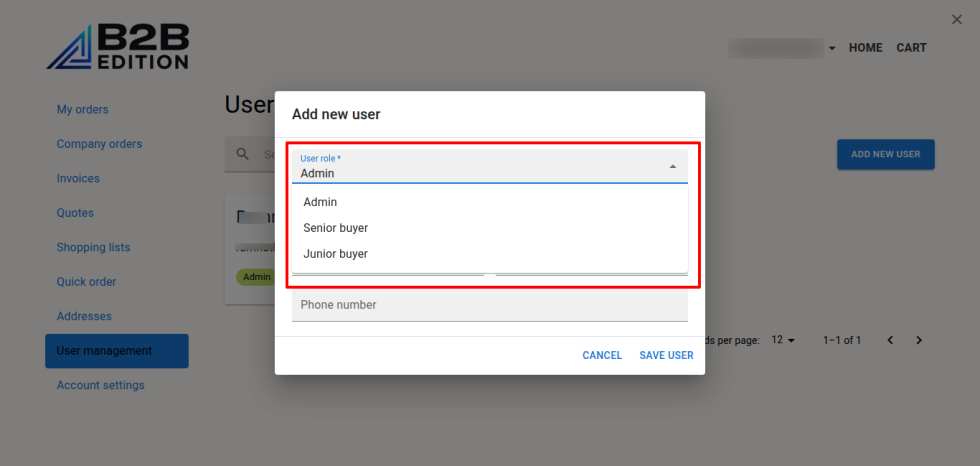
6. In the email field, add an email for the user. The email should be used by any other existing user.

7. Now, add Firstname, Lastname, and phone(optional).

8. Then, save the user.

9. Repeat the process to create more Buyers.

Adding Buyers from the B2B Edition control panel

If you want to add the Buyers from the B2B Dashboard, your user account must have the permissions to View Companies, View Company Detail, View Company Users, Update User, View Company Users and Roles, and View Users in the B2B Edition control panel:

1. Log in to your Bigcommerce control panel and go to the B2B control panel.

2. Now, navigate to Companies and select the company for which you want to add users.

3. Then, go to the Company users tab. You will see a list of the company users.

4. Click the “Add new +” button. You will see a pop-up with fields for creating the users.

5. Now, enter the email of the user. The email should not be used by any user in the company or any other company.

5. Select a role(Admin, Senior buyer, Junior buyer or any other custom role if available).
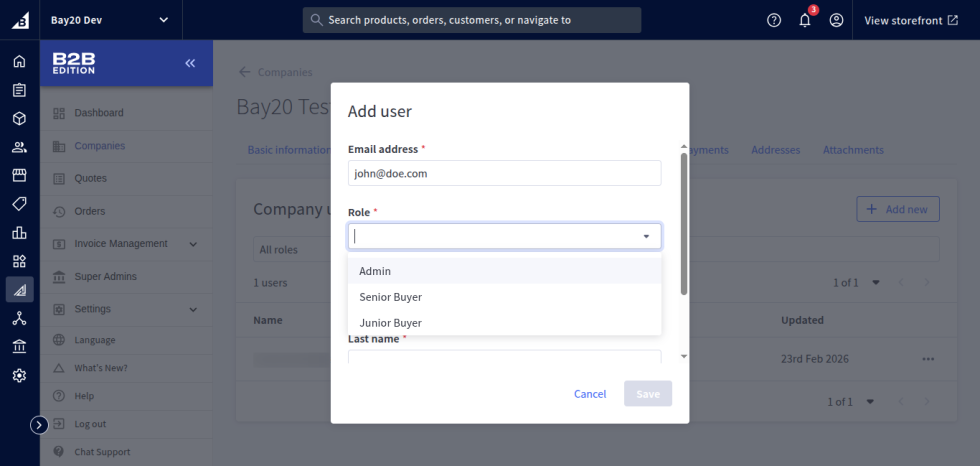
6. Enter the Firstname, Lastname, and phone(optional).

7. After entering the details, save the user.

8. Repeat the process to create more Buyers.

Please contact us at wargis@bay20.com/manish@bay20.com or call us at +91-9582784309 or +91-8800519180 for any support related to Shopify or Bigcommerce. You can also visit the Shopify or Bigcommerce development page to check the service we offer.

Tags

Administrator Android B2B BigCommerce Bigcommerce Stencil Bigcommerce Tuitorial Case Studies Catalog Management Catalyst CMS Composable Storefront Developer Development Drupal Ecommerce General Setting Germany Headless Html/css LWC Magento Magento1 to Magento 2 Magento2 Magento2 Tutorial Magento Administration Marketing PHP Prestashop PWA Salesforce Sales Management SEO Shopify Shopware Shopware 5 Shopware 6 Shopware 6 Tutorials Typo3 UK USA Vercel Webflow Woocommerce Wordpress Zapier

Recent Posts

  • BigCommerce Metafields in Stencil Templates (GraphQL Guide)

    BigCommerce Metafields in Stencil Templates (GraphQL Guide)

    September 9, 2026
  • AEO vs GEO vs SEO: What They Mean and How to Get Your Website Cited by AI

    AEO vs GEO vs SEO: What They Mean and How to Get Your Website Cited by AI

    September 8, 2026
  • AI Search Is Changing How Customers Find You: A Simple Plan to Get Ready

    AI Search Is Changing How Customers Find You: A Simple Plan to Get Ready

    September 8, 2026
  • Query & Filter Large Catalogs with the BigCommerce API

    Query & Filter Large Catalogs with the BigCommerce API

    September 5, 2026
  • How to Set Up and Verify BigCommerce Webhooks?

    How to Set Up and Verify BigCommerce Webhooks?

    September 5, 2026
  • Building a Custom GA4 E-Commerce Dashboard in Looker Studio

    Building a Custom GA4 E-Commerce Dashboard in Looker Studio

    August 18, 2026
  • How to Create a Custom Page Template in TYPO3

    How to Create a Custom Page Template in TYPO3

    August 17, 2026
  • BigCommerce Redirects API: Bulk Manage 301 Redirects

    BigCommerce Redirects API: Bulk Manage 301 Redirects

    August 13, 2026
  • How to Search Products by SKU in BigCommerce with Variant Pre-Selection?

    How to Search Products by SKU in BigCommerce with Variant Pre-Selection?

    August 8, 2026
  • BigCommerce Catalog API: Bulk Import Products & Variants

    BigCommerce Catalog API: Bulk Import Products & Variants

    July 29, 2026

    Let's Talk

    Client Stories

    Partners Bigcommerce Logo Magento Marketplace Logo Shopify-Partner Shopware Expert Scandi PWA Partner Magento Certified Shopware Extension Partner

    OUR WORKS

    • Ecommerce Stores
    • Design Concepts
    • Responsive Design

    phone :

    • INDIA: +91-8800519180 / 9582784309

    E-mail :

    • manish@bay20.com
      wargis@bay20.com
    • ISO Certified image 
    • Nasscom Logo

    ©2017 ALL RIGHT RESERVED By Bay20 Software Consultancy Services Pvt. Ltd.

    We use cookies on our website to give you the most relevant experience by remembering your preferences and repeat visits. By clicking “Accept All”, you consent to the use of ALL the cookies. However, you may visit "Cookie Settings" to provide a controlled consent.
    Cookie SettingsAccept All
    Manage consent

    Privacy Overview

    This website uses cookies to improve your experience while you navigate through the website. Out of these, the cookies that are categorized as necessary are stored on your browser as they are essential for the working of basic functionalities of the website. We also use third-party cookies that help us analyze and understand how you use this website. These cookies will be stored in your browser only with your consent. You also have the option to opt-out of these cookies. But opting out of some of these cookies may affect your browsing experience.
    Necessary
    Always Enabled
    Necessary cookies are absolutely essential for the website to function properly. These cookies ensure basic functionalities and security features of the website, anonymously.
    CookieDurationDescription
    cookielawinfo-checkbox-analytics11 monthsThis cookie is set by GDPR Cookie Consent plugin. The cookie is used to store the user consent for the cookies in the category "Analytics".
    cookielawinfo-checkbox-functional11 monthsThe cookie is set by GDPR cookie consent to record the user consent for the cookies in the category "Functional".
    cookielawinfo-checkbox-necessary11 monthsThis cookie is set by GDPR Cookie Consent plugin. The cookies is used to store the user consent for the cookies in the category "Necessary".
    cookielawinfo-checkbox-others11 monthsThis cookie is set by GDPR Cookie Consent plugin. The cookie is used to store the user consent for the cookies in the category "Other.
    cookielawinfo-checkbox-performance11 monthsThis cookie is set by GDPR Cookie Consent plugin. The cookie is used to store the user consent for the cookies in the category "Performance".
    viewed_cookie_policy11 monthsThe cookie is set by the GDPR Cookie Consent plugin and is used to store whether or not user has consented to the use of cookies. It does not store any personal data.
    Functional
    Functional cookies help to perform certain functionalities like sharing the content of the website on social media platforms, collect feedbacks, and other third-party features.
    Performance
    Performance cookies are used to understand and analyze the key performance indexes of the website which helps in delivering a better user experience for the visitors.
    Analytics
    Analytical cookies are used to understand how visitors interact with the website. These cookies help provide information on metrics the number of visitors, bounce rate, traffic source, etc.
    Advertisement
    Advertisement cookies are used to provide visitors with relevant ads and marketing campaigns. These cookies track visitors across websites and collect information to provide customized ads.
    Others
    Other uncategorized cookies are those that are being analyzed and have not been classified into a category as yet.
    SAVE & ACCEPT
    Call Us via Teams WhatsApp

