

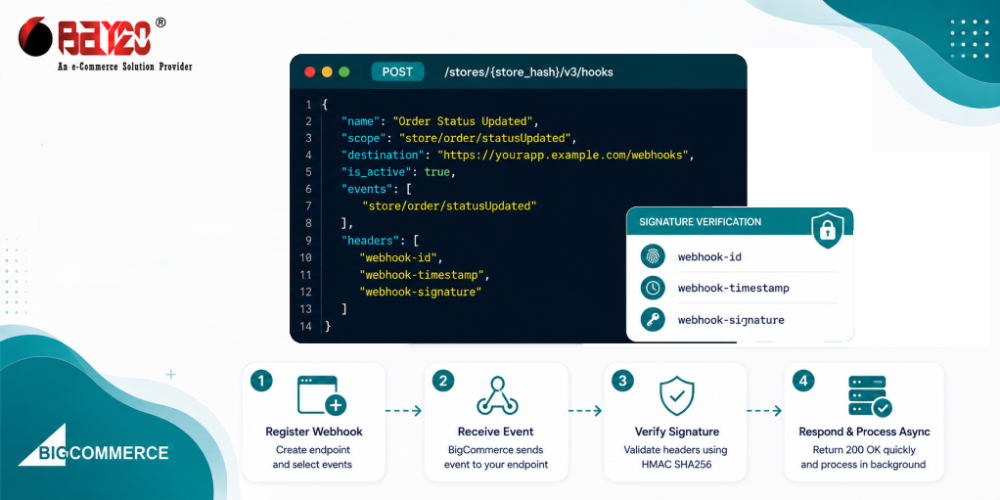
Most BigCommerce integrations start out polling. You set up a script that checks the Orders endpoint every few minutes, or the Products endpoint, or whatever resource you care about, and most of those checks come back with nothing new. It works, but it’s wasteful, and it puts a ceiling on how quickly your system can actually react to something changing. Webhooks solve this properly: instead of your code asking BigCommerce whether anything’s different, BigCommerce tells you the moment it is. Getting one registered takes a single API call. Trusting what shows up at your endpoint afterward is the part that actually needs some care, and it’s the part most tutorials skip past.
Creating a webhook
There’s no dashboard toggle for this one, webhooks are API-only. You can create one with a POST request to /v3/hooks endpoint.
POST https://api.bigcommerce.com/stores/{store_hash}/v3/hooks
X-Auth-Token: {access_token}
Content-Type: application/json
Accept: application/json

{
  "scope": "store/order/statusUpdated",
  "destination": "https://yourapp.example.com/webhooks",
  "is_active": true,
  "headers": {}
}
scope is whatever event you want to hear about, store/order/created, store/product/updated, store/cart/abandoned, etc. destination is where the payload gets sent, and it has to be HTTPS on the default port 443. Custom ports just aren’t supported, so don’t bother trying. The headers object is optional, but it’s worth using anyway, whatever key-value pairs you drop in there get sent back on every callback, which gives you a cheap way to layer a shared secret or basic auth on top of proper signature verification.
Constraints worth knowing upfront
A handful of constraints here aren’t obvious until you’ve already run into them:
- A freshly created webhook can take up to a minute before it starts actually firing. Don’t panic if your first test event doesn’t show up right away, it’s not broken, it just hasn’t warmed up yet.
- You get 10 webhooks max per unique combination of store, API client, and scope. And only one webhook is allowed per store, client, scope, and destination together, so registering the same scope pointed at the same URL twice just isn’t going to work.
- Webhooks are only visible to the token that created them. There’s no way to pull a list of every webhook across every token on a store, which is genuinely annoying if you’re debugging a multi-app setup and trying to figure out why an event isn’t showing up where you’d expect it.
- A subscription quietly deactivates on its own after 90 days of sitting idle. If you’ve got a low-traffic scope, it’s worth building in some kind of periodic check that the webhook’s still active, rather than finding out three months later that it just stopped.
The payload doesn’t tell you much on purpose
When an event fires, BigCommerce doesn’t hand you the full resource. Just enough to know something changed and where to go look for it:
{
  "store_id": "1000",
  "producer": "stores/abc123",
  "scope": "store/order/statusUpdated",
  "data": {
    "type": "order",
    "id": 173331
  },
  "hash": "...",
  "created_at": 1561479335
}
If you actually need the order details, that’s a separate call back to the REST API using the id sitting in data. This catches people off guard the first time; it feels like the webhook should just hand you everything up front, but the thin payload is deliberate. It keeps delivery fast, and it means the data you’re acting on can’t already be stale by the time you get around to reading the webhook body.
Most people skip verifying the signature
Verifying the signature is the part people skip, and it’s the part that matters most, honestly. Anyone who stumbles onto your destination URL can POST a fake payload to it if you’re not checking where the request actually came from. BigCommerce signs its webhook requests following the Standard Webhooks specification, so verification comes down to three headers, webhook-id, webhook-timestamp, and webhook-signature.
The signature itself is an HMAC-SHA256 computed over {webhook-id}.{webhook-timestamp}.{raw request body}, signed using your app’s client secret. On your end, you recompute that same HMAC with your client secret and check it against whatever signature BigCommerce sent along. The timestamp exists specifically to guard against replay attacks, so check that it’s actually recent too; matching signatures alone isn’t enough.
Here is how you can verify the signature:
import crypto from "crypto";

function verifyWebhookSignature(rawBody, headers, clientSecret) {
  const webhookId = headers["webhook-id"];
  const timestamp = headers["webhook-timestamp"];
  const receivedSignature = headers["webhook-signature"]; // format: "v1,<base64>"

  // reject anything more than a few minutes old, guards against replay
  const age = Math.abs(Date.now() / 1000 - Number(timestamp));
  if (age > 300) return false;

  const signedContent = `${webhookId}.${timestamp}.${rawBody}`;
  const secretBytes = Buffer.from(clientSecret, "base64");
  let expectedSignature = crypto
    .createHmac("sha256", secretBytes)
    .update(signedContent)
    .digest("base64");

  const receivedSigValue = receivedSignature.split(",")[1] || "";

  return crypto.timingSafeEqual(
    Buffer.from(expectedSignature),
    Buffer.from(receivedSigValue)
  );
}
Two things in here are worth flagging separately, because they’re the two ways people get this wrong on the first try. You need the raw, unparsed body for this to work at all, if your framework’s body parser has already turned the request into a JSON object by the time verification runs, the hash won’t match, since whitespace and key ordering both affect it. Grab the raw body before any parsing middleware gets near it. And use timingSafeEqual instead of a plain ===, a normal string comparison leaks timing information that makes the signature theoretically guessable one byte at a time.
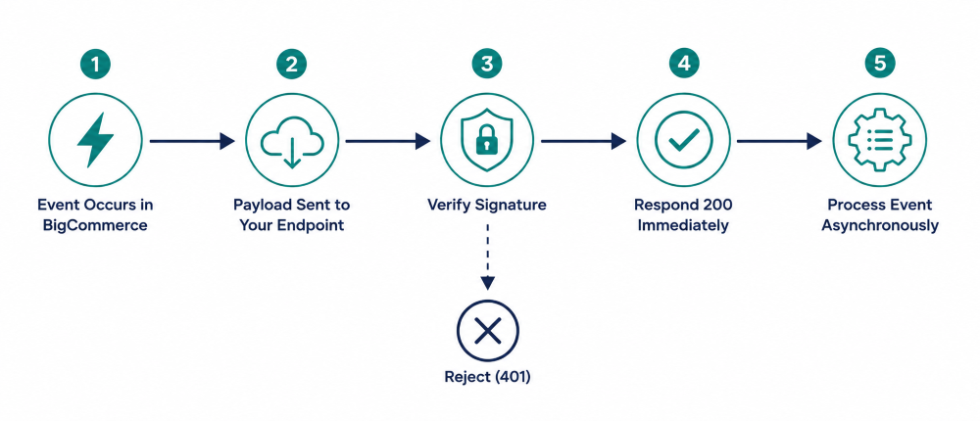
Answer fast, do the real work later
BigCommerce wants a quick HTTP 200 back, and it means it. If your endpoint takes too long to respond, the delivery gets marked as failed and dropped into the retry queue, even if your code was actually working fine, just slowly. The fix is to acknowledge the webhook immediately and push the real processing off somewhere else, a queue, a background job, whatever your stack already uses for that:
app.post("/webhooks", express.raw({ type: "application/json" }), (req, res) => {
  const isValid = verifyWebhookSignature(req.body, req.headers, process.env.BC_CLIENT_SECRET);
  if (!isValid) return res.sendStatus(401);

  const event = JSON.parse(req.body);
  res.sendStatus(200);
  processEventAsync(event);
});
Retries don’t behave quite the way you’d guess
Here’s a detail that’s easy to miss until it bites you: BigCommerce decides whether to retry based on how your whole domain is responding, not per individual webhook. So if you’ve got two separate webhooks pointed at yourapp.com/webhook-1 and yourapp.com/webhook-2, A failure on one can end up affecting retry behavior on the other, because BigCommerce is watching the domain as a whole, not each endpoint in isolation. Worth keeping in mind if you’re running several subscriptions and assume they’d each fail and recover independently. They don’t.
Failed deliveries get retried for roughly 48 hours. After that window closes, the webhook deactivates on its own, so a quiet bug that breaks your handler for two straight days doesn’t just leave you with a backlog to catch up on, it eventually stops the events entirely. It’s worth having some kind of alert on your end for a run of consecutive 4xx or 5xx responses, rather than finding out from a support ticket that order syncing quietly stopped three weeks ago.
Cutting the noise with data filters
If you only care about a slice of events inside a given scope, BigCommerce supports data filters so you’re not stuck sifting out irrelevant events on your own after they’ve already arrived. Rather than getting every single store/order/statusUpdated event no matter what it changed to, you can filter on values inside the payload’s data object and only get sent the ones you’d actually act on. Worth setting up from the start rather than writing filtering logic into your handler that the API could’ve just done for you.
Get in touch: wargis@bay20.com/manish@bay20.com | +91-9582784309/+91-8800519185 or visit Bay20 today!






