

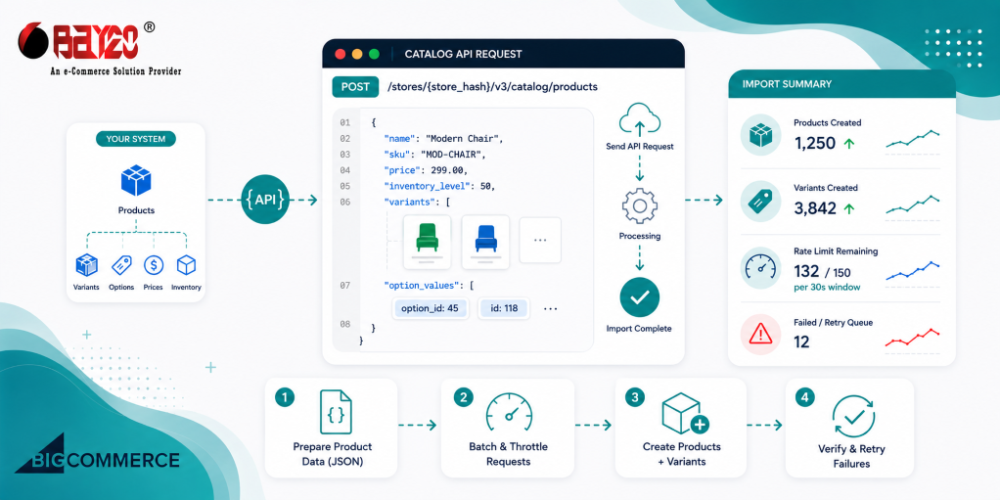
Moving a few thousand SKUs into BigCommerce sounds like it should be a single “import everything” operation. It isn’t. The Catalog API is built around separate resources, products, variants, and options, and each one plays by its own rules about what can be batched and what can’t. Get the order of operations wrong and you’ll either burn through your rate limit in the first 10 minutes or end up with a catalog full of products without variants attached to them.
This article covers how the import actually needs to be structured, where BigCommerce lets you batch and where it doesn’t, and a pattern that’s held up for pushing large catalogs in without the script falling over halfway through.
Products and variants don’t behave the same way
This is usually where people get tripped up first. On the Products resource, creation happens one product per request, through POST /v3/catalog/products. There’s no bulk-create endpoint for products, despite what you’d expect. What you do get is a batch update endpoint, PUT /v3/catalog/products, but that only works on products that already exist, and it’s capped at 10 per call.
Variants work a bit differently. If you’re creating a brand new product that has variants, size, color, whatever combination you need, you can pass a variants array right inside that same product creation call, and BigCommerce will create the product and all its variants in one go. That’s the fastest way through this, so use it whenever you can.
Where it gets slower is adding variants to a product that already exists. Say you’re expanding an existing SKU with a new color option a few months down the line. POST /v3/catalog/products/{product_id}/variants doesn’t take an array, so you’re back to one request per variant. The one real batch operation you get for variants is on updates, PUT /v3/catalog/products/variants currently lets you send up to 50 variant objects per call, and they don’t even need to belong to the same product.
Practical takeaway: front-load as much as you can into that first product creation call, base product plus its full variants array, instead of creating a bare product and bolting variants on afterward. It cuts your total request count down by a lot, and on a few-thousand-SKU import that difference adds up fast.
Limits worth knowing before you start
A handful of numbers that are easy to miss in the docs and annoying to discover mid-run instead:
- A single product tops out at 600 SKUs.
- SKUs themselves are capped at 255 characters.
- Product batch updates max out at 10 per request.
- Variant batch updates max out at 50 per request, and BigCommerce notes this number is subject to change, so don’t hardcode it into your retry logic without checking the response first.
- Deletes support bulk filtering, something like
DELETE /v3/catalog/products?id:in=101,102,103, which is genuinely useful for cleanup runs but not something people tend to reach for.
The rate limit will get you before the batch size does
Honestly, this is the part that kills most import scripts, not the batching rules. BigCommerce rate-limits per store per API client, on a rolling 30-second window. Standard and Plus plans get 150 requests per window, Pro gets 450. And every call counts against that same pool, product creates, variant updates, batch calls, all of it. If there’s another app or integration hitting the same store at the same time, you’re sharing that quota with it whether you like it or not. The response headers tell you exactly where you stand, so there’s no excuse for guessing:
X-Rate-Limit-Time-Window-Ms: 30000
X-Rate-Limit-Time-Reset-Ms: 15000
X-Rate-Limit-Requests-Quota: 150
X-Rate-Limit-Requests-Left: 35
Don’t wait around for a 429 before you react to this. Check X-Rate-Limit-Requests-Left after every single call and start throttling once it gets low. And if you do end up with a 429 anyway, respect the Retry-After header instead of picking a delay out of thin air.
An import pattern that actually holds up
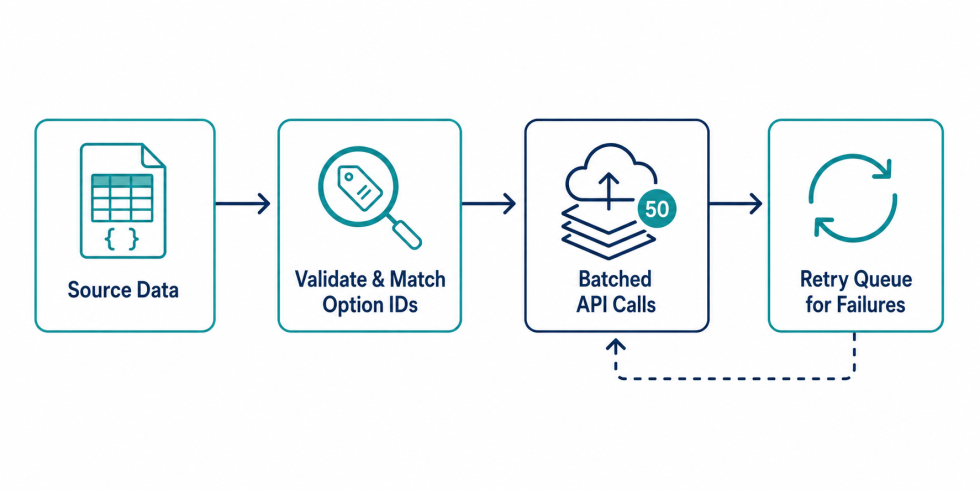
Here’s roughly what this looks like in Node when you put it together. The main ideas are to chunk the source data, stay under the quota, retry failures without re-creating anything that already succeeded, and log enough that a failed run is resumable rather than something you start over from zero.
import axios from "axios";
import pLimit from "p-limit";

const client = axios.create({
  baseURL: `https://api.bigcommerce.com/stores/${process.env.STORE_HASH}/v3`,
  headers: {
    "X-Auth-Token": process.env.BC_ACCESS_TOKEN,
    "Content-Type": "application/json",
  },
});

// keep concurrency modest, the quota is shared across everything hitting the store
const limit = pLimit(4);

async function createProductWithVariants(productPayload) {
  try {
    const res = await client.post("/catalog/products", productPayload);
    const left = parseInt(res.headers["x-rate-limit-requests-left"] || "999", 10);

    if (left < 10) {
      const resetMs = parseInt(res.headers["x-rate-limit-time-reset-ms"] || "2000", 10);
      await sleep(resetMs);
    }

    return { sku: productPayload.sku, status: "created", id: res.data.data.id };
  } catch (err) {
    if (err.response?.status === 429) {
      const retryAfter = parseInt(err.response.headers["retry-after"] || "5", 10) * 1000;
      await sleep(retryAfter);
      return createProductWithVariants(productPayload); // retry once the quota resets
    }

    return { sku: productPayload.sku, status: "failed", error: err.response?.data || err.message };
  }
}

function sleep(ms) {
  return new Promise((resolve) => setTimeout(resolve, ms));
}

async function runImport(products) {
  const results = await Promise.all(
    products.map((p) => limit(() => createProductWithVariants(p)))
  );

  const failed = results.filter((r) => r.status === "failed");
  if (failed.length) {
    console.log(`${failed.length} products failed, writing to retry-queue.json`);
    // write these back to disk so a later run only touches what actually failed
  }

  return results;
}
The two things carrying most of the weight here are pLimit, which keeps concurrency low enough that you’re not slamming the quota all at once, and checking X-Rate-Limit-Requests-Left on every response instead of only reacting once a 429 has already happened.
Getting the option values right for variants
Here’s something that catches almost everyone the first time around: variants need more than just a SKU. They need option_values, and those reference option and option-value IDs that already have to exist somewhere before the variant does. If your source data just has “Color: Red” sitting in a spreadsheet cell, you can’t drop that string straight into the variant payload and expect it to work.
There are two ways around this. You either create the product’s options and their values ahead of time, grab the IDs BigCommerce hands back, and reference those. Or, if you’re creating the product fresh, you define the options and option values inline in that same product payload and let BigCommerce wire the references up for you as part of the same call.
The second route is a lot less painful for a fresh import. Building your own option value lookup and matching it against your source file before the API call ever fires means you catch mismatched color or size names on your end, in your own script, instead of getting a vague 422 back from the API in the middle of a run.
Duplicate SKUs will silently break your run
BigCommerce won’t let two products share a SKU. It just rejects the request outright, no merging, no silent update. Before kicking off a bulk creation job, pull the SKUs that already exist with something like GET /v3/catalog/products?sku=... and diff that against your import file first. Anything that’s already there needs to go through the update path, not the create path.
This is also where it’s worth deciding, before you run anything, whether the import needs to be idempotent. If the script dies at product 3,000 out of 10,000 and you have to run it again tomorrow, you want it to pick up from where it stopped, not throw SKU conflict errors on every product that already succeeded the first time.
How long this actually takes
For a Standard or Plus store sitting at 150 requests every 30 seconds, and assuming most products create cleanly with their variants bundled into that first call, you’re looking at somewhere around 300 products a minute if you’re pushing right up against the ceiling with nothing else hitting the store. In practice it’s almost always slower than that, because option lookups, image uploads, and retries are all pulling from the same quota. Pro stores on the 450/30s tier obviously have more room to work with. Either way, plan for the run to take longer than the math suggests, and build the script so that a network blip at product 8,000 doesn’t mean starting the whole thing over.
Please contact us at wargis@bay20.com/manish@bay20.com or call us at +91-9582784309 or +91-8800519180 for any support related to Bigcommerce. You can also visit our website to check the services we offer.






