

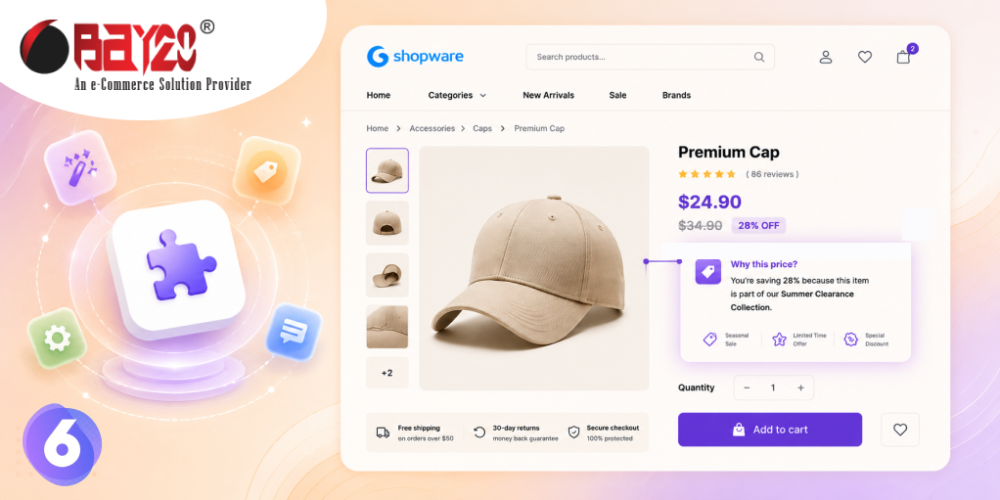
A struck-through price is one of the oldest tools in retail, and one of the laziest. It tells a shopper a number used to be higher. It does not tell them why it is lower now, how long that will last, or whether it is worth acting on today.
Pseudo Price Custom Text lets you add that missing sentence — and only where it belongs.
Text that appears only when there is a discount
The plugin displays a custom line of text on Shopware 6 product pages, but only on products that have a pseudo-price set. That conditional behaviour is the whole point. You are not manually tagging hundreds of products or remembering to strip messaging off when a sale ends — the text follows your pricing automatically.
Set a pseudo-price, and your message appears. Remove it, and the message disappears with it. No cleanup, no stale “Summer Sale” banners haunting your store in November.
Make it say something useful
The value comes from what you write. A few directions that work harder than a bare strike-through:
- Frame the saving in plain language, so the discount is understood at a glance rather than calculated.
- Give a reason — end-of-line, clearance, seasonal, bundle offer. A reason makes a discount credible instead of suspicious.
- Add a time frame if one genuinely exists, so hesitation has a cost.
- Reassure on quality, which matters most on premium items where a discount can raise doubts.
You can also set the text colour to match your brand palette, and vary the wording per sales channel — so a B2B storefront can speak differently from a consumer one, or your German and English channels can each get properly localised copy.
One important note on pricing law
If you sell into Germany or the wider EU, remember that reference prices are regulated. Under the Price Indication Ordinance (PAngV) and the EU Omnibus Directive, a struck-through price shown alongside a discount generally has to reflect the lowest price you charged in the preceding 30 days. This plugin controls the message, not the compliance of the underlying price — so make sure your pseudo-prices are genuine, and your messaging becomes a straightforward asset rather than a risk.
Practical details
Install, activate, clear the cache, then configure the text and colour under Extensions → My extensions → Configure. It runs on Shopware 6.5.0.0 through 6.7.12.1, ships in English and German, and includes a free trial month.
See Pseudo Price Custom Text on the Shopware Store, or explore the rest of our ecommerce development services if you are planning a broader storefront overhaul.
For more updates or any support related to Shopware 6, please contact us at wargis@bay20.com/manish@bay20.com or call +91-8800519180 / +91-9582784309. You can also visit our Shopware development page to explore the services we offer.






