


If you want to add an “Add Embroidery” option to a BigCommerce store, your first instinct might be to go looking for an app. There are a few personalization apps out there, and they’re fine. Still, they come with a monthly fee. They usually store the customer’s input somewhere outside BigCommerce, and you rarely get to make the UI look like it belongs on the site instead of bolted onto it.
There’s a simpler way that uses nothing but the stuff BigCommerce already gives you: product modifiers. I’ve built this a few times now, so here’s roughly how I’d approach it.
The short version: set the embroidery fields up as normal product options, then use a little JS to reveal them properly on the product page and keep everything tied to price rules BigCommerce already handles. You’re not building a second system to track what the customer pickes, you’re just improving how the one BigCommerce already has gets presented.
Start in the admin, not in the code
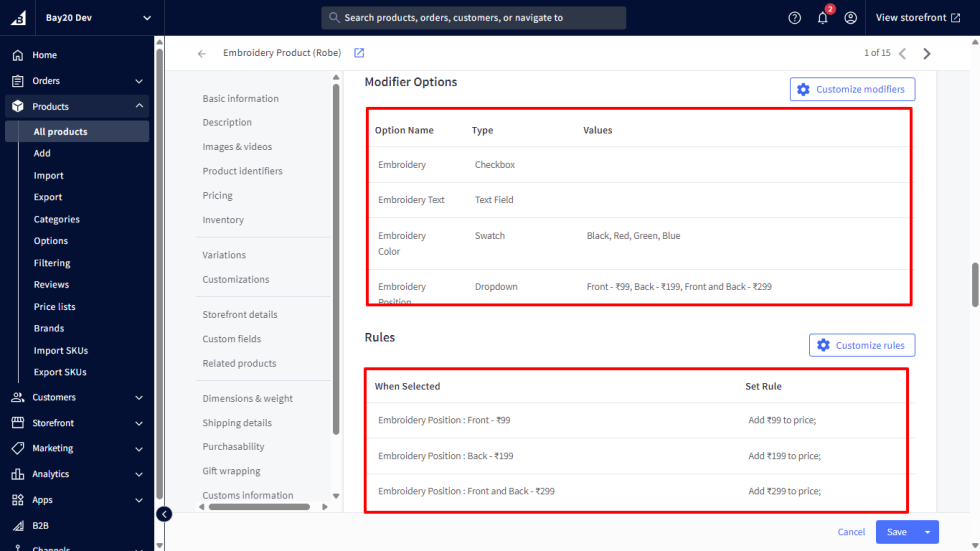
Say you’re doing this for a jacket. Before touching a single template, set up the modifiers on the product itself, under Options/Modifiers:
- A checkbox called something like “Embroidery” is just a flag, driven by JS, so the rest of the store knows whether this line item has embroidery on it.
- A text field for the embroidery text, with a character limit if your embroiderer has one. Customers will try to fit a paragraph in there if you let them.
- A dropdown for font.
- A swatch option for thread colour, if BigCommerce’s swatch type works for what you’re offering. A list of colour names is a lot less useful than an actual swatch.
- A radio set for placement (left chest, sleeve, back, etc). This is usually the one that carries a price bump, and you set that price rule right there on the modifier.
That last point is the whole trick to keeping this simple: don’t calculate embroidery pricing yourself. Let BigCommerce do it. Once the rule lives on the option, its built-in “recalculate price on option change” behaviour just works, and you never touch pricing logic in your own code.
Let the options render on the product page
Let the fields sit right there on the product page like any other option, and use JS to tidy up the experience around them. A few things worth doing:
- Only reveal the embroidery fields once the “Embroidery” checkbox is ticked, instead of showing five extra fields to every visitor by default.
- Add a small live preview of the text near the option, updating as the customer types, so they get some feedback without leaving the page.
- Disable the add-to-cart button until the required fields (text, colour, placement) are filled in. So you’re not relying on BigCommerce’s default validation messaging alone.
None of that needs to be complicated. Something like this is enough to get the show/hide and preview working:
const toggle = document.querySelector('#attribute_embroidery_toggle');
const fields = document.querySelector('.embroidery-fields');
const textInput = document.querySelector('[data-name="Embroidery Text"]');
const preview = document.querySelector('#embroideryPreview');

toggle?.addEventListener('change', () => {
  fields.style.display = toggle.checked ? 'block' : 'none';
});

textInput?.addEventListener('keyup', (e) => {
  preview.textContent = e.target.value || 'Your embroidery text will appear here';
});
That’s really it for the core interaction. Wire the “required before add-to-cart” check the same way you’d handle any other required option on the theme, and let BigCommerce’s own option-change handling take care of the price update when placement changes.
What happens once it’s in the cart
Once an embroidered item is in the cart, BigCommerce already gives configurable products an edit-options link, so a customer can go back and change their text, font, or placement without contacting support. That flow reuses the same fields and the same logic, it’s just triggered from the cart instead of the product page. Worth its own post if there’s interest.
Why I prefer this instead of an app
Mostly because it’s free, and because the data never leaves BigCommerce. The embroidery choices show up as normal option values on the order, right where anyone looking at it in admin would expect to find them. No separate dashboard, no webhook that can quietly stop syncing one day.
The trade-off is that you own it. If someone later wants per-font character limits, or validation that stops people from typing emoji into the embroidery text, that’s on you to build, not on a vendor’s roadmap. For a lot of stores, that’s a fair trade. For others, paying for an app that already handles the edge cases is the better call. Worth having that conversation with the client before you start, not after.
Please contact us at manish@bay20.com or call us at +91-9582784309 or +91-8800519180 for any support related to Bigcommerce. You can also visit our website to check the services we offer.






