


With Bigcommerce B2B Edition, your B2B customers, or buyers, can access their Company’s Buyer Portal from the storefront to manage orders, request sales quotes, and pay invoices. Every buyer has a user account, which is assigned a specific role to determine what they can view and configure within the Buyer Portal. There are 2 ways to add buyers to a company in the B2B Edition.
Adding Buyers from the B2B Buyer Portal
You can buyers to a company from the B2B Buyer Portal if you are a user of the company with an Admin role.
1. First, go to your storefront and log in as a user with the Admin role of the company.
2. Now, go to the B2B Buyer Portal by clicking the “Account” from the header.
3. Then, go to user management from the left sidebar of the B2B Buyer Portal. You will see already existing buyers(junior and senior) and Admin users listed here.
4. Click the “Add new user” button to start creating the user.
5. Select a user role (Admin, Senior Buyer, or Junior Buyer). If there is any custom role created from the admin panel of the storefront, you can also select that user role.
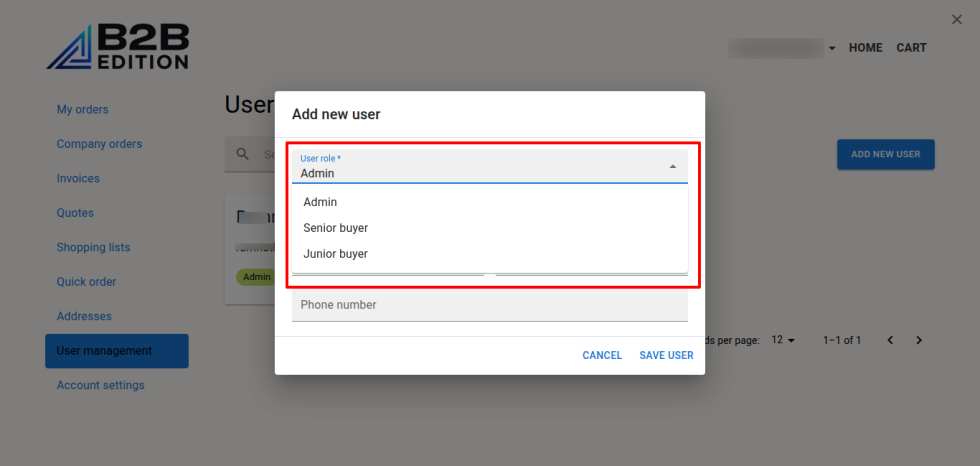
6. In the email field, add an email for the user. The email should be used by any other existing user.
7. Now, add Firstname, Lastname, and phone(optional).
8. Then, save the user.
9. Repeat the process to create more Buyers.
Adding Buyers from the B2B Edition control panel
If you want to add the Buyers from the B2B Dashboard, your user account must have the permissions to View Companies, View Company Detail, View Company Users, Update User, View Company Users and Roles, and View Users in the B2B Edition control panel:
1. Log in to your Bigcommerce control panel and go to the B2B control panel.
2. Now, navigate to Companies and select the company for which you want to add users.
3. Then, go to the Company users tab. You will see a list of the company users.
4. Click the “Add new +” button. You will see a pop-up with fields for creating the users.
5. Now, enter the email of the user. The email should not be used by any user in the company or any other company.
5. Select a role(Admin, Senior buyer, Junior buyer or any other custom role if available).
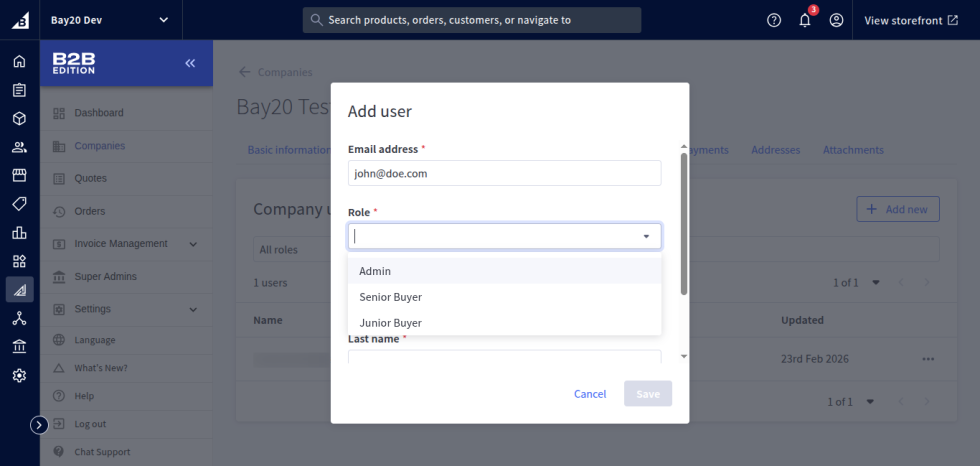
6. Enter the Firstname, Lastname, and phone(optional).
7. After entering the details, save the user.
8. Repeat the process to create more Buyers.
Please contact us at wargis@bay20.com/manish@bay20.com or call us at +91-9582784309 or +91-8800519180 for any support related to Shopify or Bigcommerce. You can also visit the Shopify or Bigcommerce development page to check the service we offer.






